Discover how synthesizers shape sound with oscillators, filters, and envelopes. Explore essential waveforms, ADSR controls, and beginner-friendly keyboards from Korg, Roland, Arturia, and Yamaha—balancing features with simplicity for your musical journey.
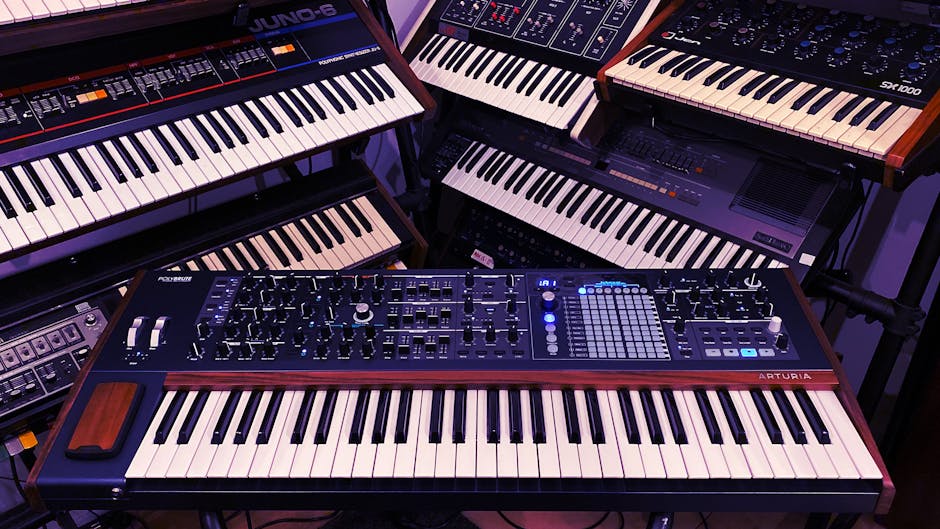
Starting with a synthesizer can feel overwhelming. Rows of knobs, sliders, and buttons stare back like the cockpit of an unfamiliar machine, leaving many beginners unsure where to begin. Yet every professional player once stood at the same starting line.
The truth is, you don't need to master every feature in one day. The most rewarding approach is to keep it simple: play a few keys, adjust a knob or two, and let your ears guide you. Discovery is at the heart of synthesis, and small experiments often spark the biggest breakthroughs.
For those taking their first steps, industry professionals recommend exploring different instruments in person whenever possible. Musical instrument retailer encourages beginners to test a variety of models, noting that the tactile feel of the keys and controls often shapes a player's connection to the instrument. Their Gear Experts also point out that hands-on guidance can help new players avoid common pitfalls when choosing their first synthesizer.
A synthesizer produces sound through electronic signals rather than acoustic vibrations, setting it apart from traditional instruments. This is what gives synths their unmistakable character.
Unlike guitars or pianos, which are bound by physical materials, synthesizers let musicians build sounds from the ground up. That flexibility allows for everything from convincing instrument emulations to entirely new sonic textures that have never existed before.
For beginners, the control panel can feel like a maze of knobs and sliders. Industry experts often suggest focusing on a few core components first:
New players will quickly encounter the analog vs. digital debate. Analog synthesizers use circuitry to generate sound, producing a warm, organic tone with a hands-on, knob-per-function feel. Digital synthesizers rely on computer processing, offering stability, expanded features, and vast preset libraries.
Most modern instruments blur the line, combining both approaches in hybrid designs. Professionals at Sam Ash recommend that beginners focus less on the label and more on how an instrument feels to play. Starting with a machine that offers quality presets can also provide a learning path, allowing new players to reverse-engineer sounds while gradually developing their own.
Every synthesizer sound begins with oscillators—the raw tones that form the foundation of all patches. The four basic waveforms are the building blocks of synthesis:
Beginner-friendly exercise: play a simple melody using each waveform type to hear the dramatic contrasts. Layering two waveforms is another pro-level technique for creating thicker, more complex tones.
Filters sculpt sound by deciding which frequencies are heard. Professionals often compare them to EQ tools with more character:
Adjusting resonance around the cutoff frequency can add presence or sweep effects—subtle settings are great for warmth, while extreme values create the classic "whooshing" synth sound.
Envelopes shape how a note evolves from start to finish, often using the ADSR model:
Classic ADSR examples:
Modulation introduces motion and expression, preventing sounds from feeling static:
Professional players often treat synthesizers differently from pianos or organs. Instead of filling every moment with notes, they focus on space—letting the sound itself breathe. Because synthesizers can sustain indefinitely, short phrases with deliberate pauses often create more impact than continuous playing.
Another technique is shifting registers. Playing the same phrase in different octaves can transform the character of a patch entirely, from airy textures up high to powerful, growling tones in the lower range.
Arpeggiators act like built-in rhythm partners, breaking held chords into repeating note sequences. They're especially useful for beginners or for sparking fresh ideas:
The result can be anything from pulsing basslines to shimmering backdrops. Many industry professionals recommend experimenting with arpeggiators as a way to push past creative blocks.
The two wheels on the left side of most keyboards offer expressive control:
The Korg Minilogue XD is often cited as an ideal first instrument thanks to its intuitive design and versatility. Each knob controls a single function, making the learning process straightforward. With four-voice polyphony, a built-in sequencer, onboard effects, and a real-time oscilloscope display, it strikes a balance between simplicity and depth. While not the cheapest option, it's an instrument beginners can grow into rather than outgrow.
For those who find traditional synthesis intimidating, the Roland GO:KEYS 5 takes a different approach. Its loop-based workflow makes it easy to layer parts into complete tracks, even with minimal experience. With more than 1,000 sounds, built-in speakers, Bluetooth connectivity, and app integration, it emphasizes immediacy and fun—ideal for newcomers who want quick results without deep programming.
Adventurous beginners often gravitate toward the Arturia MicroFreak, a compact synth with unconventional features. It includes 12 oscillator modes—from wavetable to speech synthesis—alongside a polyphonic aftertouch touch keyboard and a flexible modulation matrix. Its unpredictable nature encourages exploration, rewarding players who enjoy discovering unexpected textures.
The Yamaha Reface CS offers a stripped-down, slider-based interface that makes synthesis concepts immediately clear. Lightweight, portable, and optionally battery-powered, it’s a strong choice for learners who want hands-on control without complexity. Despite its small size, its sound engine is powerful and its mini keys play more responsively than expected.
Learning synthesis takes time, but steady practice pays off quickly. With just 15-30 minutes a day, most beginners can move from tentative key presses to building their own sounds in a month. Here's a practical roadmap:
Experiment with oscillators and filters. Train your ear to recognize different waveforms and start crafting simple bass and lead tones.
Work with envelopes to shape how sounds evolve. Practice creating plucks, pads, and basses by adjusting attack, decay, sustain, and release.
Introduce LFOs, modulation, and expressive tools like pitch and mod wheels. Explore arpeggiators to add rhythmic variety and new ideas.
Combine all elements to design full sounds. Try recreating tones from your favorite songs and start building a personal library of patches.
The goal isn't speed, but consistency and curiosity. Even simple daily sessions lead to breakthroughs and often spark creative ideas that extend far beyond practice.
For those ready to take the next step, many retailers provide access to a wide range of beginner-friendly and professional synthesizers, along with expert advice on choosing the right fit. Whether the aim is live performance, electronic production, or adding fresh textures to a band, the path into synthesis is one of the most rewarding journeys a musician can take.


